







|
Frequently asked questions
How do I redownload my fonts?
To download previously purchased fonts, please login to your account and click the "Download" button for the order you want to download again. If it has been two years since your order or you have downloaded the package four times, you may click the "Reset Downloads" link to add the fonts to your cart at a 50% discount and proceed to reorder.
This will ensure that you receive the latest version of the fonts which may include improvements and bug fixes. 
How do I use LHF Desire or use alternates? Charles Borges de Oliveira, the creator of LHF Desire, packed in over 700 glyphs into one font. The method you use to access these glyphs will vary depending on the application you are using.
After installing the "LHF Desire Pro" font, choose one of the methods below to access the alternates. Adobe Illustrator (CS or newer) Charles Borges de Oliveira demonstrates how to access the character variations of his LHF Desire font using Adobe Illustrator's Glyph Palette. This method will work with all LHF fonts.
Adobe Photoshop (CC or newer)
Patrick Kalange shows how to access your font's alternate characters using the Glyph Palette in Adobe Photoshop CC.
Windows Character Map
Charles Borges de Oliveira demonstrates how to access the character variations of his LHF Desire font using the Windows Character Map with Adobe Photoshop. This method will work for all LHF fonts.
PopChar
Charles Borges de Oliveira demonstrates how to access the character variations of his LHF Desire font using PopChar with Adobe Photoshop. This method will work for all LHF fonts.
BabelMap
Patrick Kalange demonstrates how to access LHF Tributary's many character variations using Adobe Photoshop for PC and BabelMap. This method works with all LHF fonts. BabelMap is a free alternative to the default Windows Character Map. If you find it useful, you might want to send its creator Andrew West, a donation through his site: www.babelstone.co.uk
CorelDraw
Now it's easier than ever to find and insert OpenType font special characters, symbols and glyphs in CorelDRAW and Corel PHOTO-PAINT. The revamped Insert Character Docker automatically displays all the characters, symbols and glyphs associated with a particular font. You can also now filter subsets to display only the characters you want. It's a faster, easier way to work with OpenType fonts!
Mac using Font Book
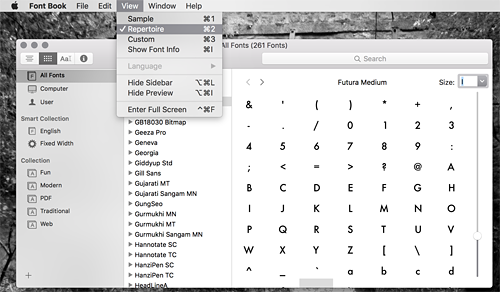
If you're using a Mac, access the glyphs by using Font Book (Finder > Applications > Font Book). Select View and and change to Repertoire. You may then copy the desired glyph using "Command+C" and paste it into your document or drag and drop the glyph into your design application.
Can I use the fonts for commercial purposes? Yes, of course! We want you to make money using our fonts. An overview of our License and Usage Policy can be found here.
Why is my order not going through? VPN The cart system must be able to detect a valid IP address. If your IP address is being obfuscated or you are using a proxy, the order will likely fail. Please turn off your VPN and attempt your order again. If you are unable to disable your VPN or you continue to experience problems ordering, please contact us for assistance. Ordering outside of your country When the cart detects that the billing country you used does not match the country you are currently in, the order will be rejected. Sometimes a false error can occur with billing addresses near country borders. If you are traveling or suspect there may be an issue with billing country, please contact us so we can assist you with your order. IP address blacklisted The cart system checks for high risk IP addresses. If your IP address has been blacklisted with two or more organizations, it will likely be flagged as high risk and rejected. To check if your IP address has been blacklisted, visit: https://whatismyipaddress.com/blacklist-check. If you feel the blacklist is in error, contact us for assistance with your order. Card issuer restriction Banks sometimes place restrictions on debit and credit cards. This can happen if the card has been used recently used for several individual transactions or the issuing bank suspects fraud for another reason. Please try a different credit card or choose PayPal as your payment method. If you do not have a different payment method, please call the issuing bank to request that the restriction be lifted. Error 9010 If you are receiving the error code 9010, you may be attempting to order from a country that we do not accept payment from. You may also see this error if you have selected the wrong country in your billing information. If your country is not listed in our cart system, please contact us to request that it be added. If you are attempting to order from within the US and you are receiving this error, please contact us for assistance. Too many failed attempts If your order fails more than twice, please contact us and do not attempt to order again. For security purposes, multiple failed order attempts will automatically disable the account and you will receive the message: "Too Many Failed Payments". Please review the above possible solutions and contact us to reset your account.
Why am I receiving the "Already Registered" error? The credit card you are attempting to use is already registered to another Letterhead Fonts account. Each Letterhead Fonts account must have a unique credit card (or PayPal account) associated with it. Instead of creating a new account, please login using your existing account and update the required information.
If you are creating a new account because your email address changed, simply contact us and we'll be happy to update the email address for you. Please do not create a new account. Doing so will cause your old account to become disabled and you will be unable to download your previous purchases.
Adobe no longer supports Type 1 fonts. How does this affect me? Adobe's statement: "Type 1 fonts, also known as PostScript, PS1, T1, Adobe Type 1, Multiple Master, or MM..." is misleading and has caused some confusion. They will continue to support PostScript OpenType fonts. They just won't support PostScript Type 1 fonts. In 2007, we converted all fonts to the PostScript OpenType format.
If you purchased your LHF fonts after 2007, you have PostScript OpenType fonts (OTF) and have the highest-quality format available, which Adobe will continue to support of course. If you have older fonts in the format of TTF, PFM/PFB, SUIT/BMP, purchased prior to 2007, they cannot be replaced (this was announced in 2010). Purchasing new licenses for these fonts will not only give you the higher-quality PostScript OTF format, but also the revisions and improvements made to the fonts since then.
I don't see the font I want listed on the package page Not all fonts qualify for the custom package discount. Usually these are newly released fonts or premium fonts that cannot be discounted.
Can I use these fonts in my applications? All Letterhead Fonts are Postscript OpenType. This is the highest quality format available. This means that the letters you see on your screen are exactly the way the original artist drew them. Older formats, such as TrueType, are undesirable because they alter the original letters by adding several unnecessary points to the paths and change the lines. If you are in doubt as to whether your applications can use Postscript OpenType fonts, please download and install our .OTF test font prior to ordering.
This chart lists known applications that support Postscript OpenType.
Can I try the fonts before I buy? Yes, although it is old and cumbersome (sorry), you may use the TypeTester which allows you to type your own message using the fonts. We have plans to create a better testing system in the future.
How many computers can I install the fonts on? You may install the fonts on up to 2 computers (per license) purchased by you or your company. If you need to install the fonts on more than 2 computers, each font page has a drop-down menu which allows you to purchase multiple licenses at a discounted price. For example, if you purchase 5 licenses for a font, then the font may be installed on 10 computers purchased by you or your company.
How do I migrate my fonts to a new computer? Postscript OpenType fonts work for both PC and Mac. If you are switching from one to the other, dont worry, the process of downloading your fonts to a new system is the same for both PC and Mac.
On your new system, please log in to your account. Once logged in, you will automatically be taken to the Account Manager page, where you can view and download all previous orders. You will see a green "Download" button next to each order description. Unless you have purchased additional licenses, you may install the fonts on up to 2 systems (per license) purchased by you or your company. Please make sure you have only installed the fonts on up to 2 computers at any given time or contact us to purchase additional licenses.
Can I give the font to my designer or printer? The purchaser is the only licensed user and that name and account ID is embedded into each font. If you are a client and wish to have a designer create a project for you using our fonts-- please do not purchase a license. Since the fonts will be licensed to you, only you may use the fonts and your graphic designer will not be able to use the fonts. Instead, please have your graphic designer purchase a license and then bill you for the cost. Should both you and your designer need the font, we offer a discount for the second licensing party. Simply contact us with the name and email of your designer and we'll take care of the rest.
Please never, under any circumstances, send your fonts to any third-party. We need your help to prevent piracy and you will have no control over what happens to the fonts once they leave your hands. If you need to give your design project to a printer or other third-party, please take the step of converting the fonts to vector outlines or embedding them into the file instead of sending the actual font files to the third-party.
Can I give the font to my client? The purchaser is the only licensed user and that name and account ID is embedded into each font. Since the fonts are licensed to you, only you may use the fonts. Usually, the design can be given to the client in such a way (converting to vector outlines or embedding) that they do not need the actual font file at all. If your client still requires the font, please do the right thing and ask them to contact us. We will then provide your client with their own license at a discounted price.
As a fellow artist and designer, we need your help to prevent our hard work from being shared. Though your client may be honest and trustworthy, you have no control over what happens to the fonts once they leave your possession. For example, your client's computer could be accessed by other less scrupulous individuals and as a result, the fonts may be copied and uploaded to file sharing sites. Seeing our hard work being shared freely is disheartening to say the least. Help us to continue making new fonts for you by not sharing. Thanks.
How do I install my fonts? Windows:
The following tutorial explains how to extract your font files from the downloaded packages and then install them easily in Windows 7 and newer. Mac: Double click on the .zip package you downloaded. This will create a folder on your Desktop containing the fonts. Double-click on the fonts to open Fontbook. Click on the "Install" button to install the fonts. Open your desired program. Your Letterhead Fonts will begin with the preface "LHF."
Why aren't the fonts showing up in my application? The application was open during installation
Most applications must be closed when you install the fonts. If the fonts are not appearing in the list, restart the program for the changes to take effect. In some cases the operating system is to blame. Therefore, restarting the computer may also be necessary. Not looking for correct name All Letterhead fonts begin with the preface "LHF". This means that the Unlovable font is actually named "LHF Unlovable" and therefore would appear within the L's in alphabetical order. Fonts not installed correctly Please make sure that you have followed the instructions for installing the fonts and that you have properly extracted the fonts from the .zip package they came in. Attempting to place the .zip package itself into the System Font folder will not install the fonts. They must be extracted first. A good test is to see if the fonts are available in WordPad (PC) or SimpleText (Mac). If the fonts appear there, then the fonts are installed correctly and the problem is something else. Application doesn't support Postscript OpenType fonts If your application is very old, there is a chance that it cannot use Postscript OpenType fonts at all. Check the program compatibility chart. If you are in doubt as to whether your applications can use Postscript OpenType fonts, please download and install our .OTF test font prior to ordering.
Why are the letters cut off or incomplete? Some of our font sets include decorative bottom or top halves, shadows and lines that are not supposed to be used by themselves. You are probably looking at a decorative font that is part of a multi-part set and the font you are viewing is intended to be placed on top of the base font in the set. For these to make sense, look for the solid base font in the set and try laying these decorative fonts on top of that base font and then change the color. The font's page will explain in more detail how to use these fonts and show examples. You can also refer to the instructions that came with the font in the package.
When do I receive the fonts? All fonts are downloaded immediately. After you order goes through, you are presented with a Download button. All fonts remain in your account for life. So you may also download the fonts from your Account Manager.
Do you offer any quantity discounts? Yes. Check out our popular 4 or More where you can choose any 4 fonts for only $35 each. Additional fonts after 4 are also discounted, so the more you buy, the more you save. A few fonts don't qualify though-- usually new releases or premium fonts like LHF Desire.
Where is my bonus font/panel? If you chose a bonus gift when checking out, you were presented with two .zip packages when downloading (one for the order and one for the bonus gift). If you forgot to download your bonus gift, you can do so by simply logging into your account. You will then find your bonus gift below your order in a section named "Bonus Gifts". If you forgot to choose a bonus gift when checking out, you may contact us and we can place into your account.
|
 |
|

FAQ
 Before You Order Ordering Accessing Alternates Downloading Fonts Redownload Fonts Updating Your Fonts Installing Your Fonts Using LHF Desire Convert to Outlines Compatible Programs OTF Test Font Bugs & Quirks License & Usage Tutorials Contact Us |
  |
 |
|
||||
|
|||||
CONTACT VIEW ALL FONTSFREE STUFFBONUS GIFTSLICENSE & USAGEPRIVACY POLICYHAPPY CUSTOMERS SAY...LIFETIME GUARANTEETYPETESTERFONTGUARD SUBSCRIBE VIEW ALL FONTSFREE STUFFBONUS GIFTSLICENSE & USAGEPRIVACY POLICYHAPPY CUSTOMERS SAY...LIFETIME GUARANTEETYPETESTERFONTGUARD SUBSCRIBE |
|
|
|